
Skip to product information
1 of 3

Yellow PEEK Disc – 98mm / 95mm Dental CAD/CAM Polymer

Warm-toned Yellow PEEK CAD/CAM disc designed for professional dental laboratories requiring a lightweight, metal-free polymer material for selected prosthetic, framework, and digital milling workflows.Available in 98mm open-system and 95mm Zirkonzahn formats with multiple thickness options from 12mm to 25mm.

Regular price $55.00
Sale price $55.00 Regular price $70.00
Shipping calculated at checkout.
  • 98mm Open System & 95mm Zirkonzahn formats
  • Yellow PEEK CAD/CAM Polymer
  • Lightweight metal-free CAD/CAM material
  • Designed for professional dental laboratory milling
  • Lab support before ordering
  • No Post-Milling Sintering Required

    OnePro Dental Yellow PEEK Disc is a high-performance CAD/CAM polymer material designed for professional dental laboratories requiring a lightweight, metal-free option for selected prosthetic, framework, and digital milling workflows.

    Made from polyetheretherketone (PEEK), the material features a distinctive warm yellow base color that can help laboratories visually differentiate it from Natural, White, and Pink PEEK materials during storage, milling, and production.

    Yellow PEEK can be digitally designed and milled using compatible dental CAD/CAM systems and does not require post-milling sintering. Depending on the final prosthetic design, additional surface treatment, veneering, characterization, bonding, or finishing may still be required.

    Available in 98mm open-system and 95mm Zirkonzahn formats with thickness options from 12mm to 25mm. Please confirm your milling machine, holder configuration, intended application, and processing requirements before ordering.

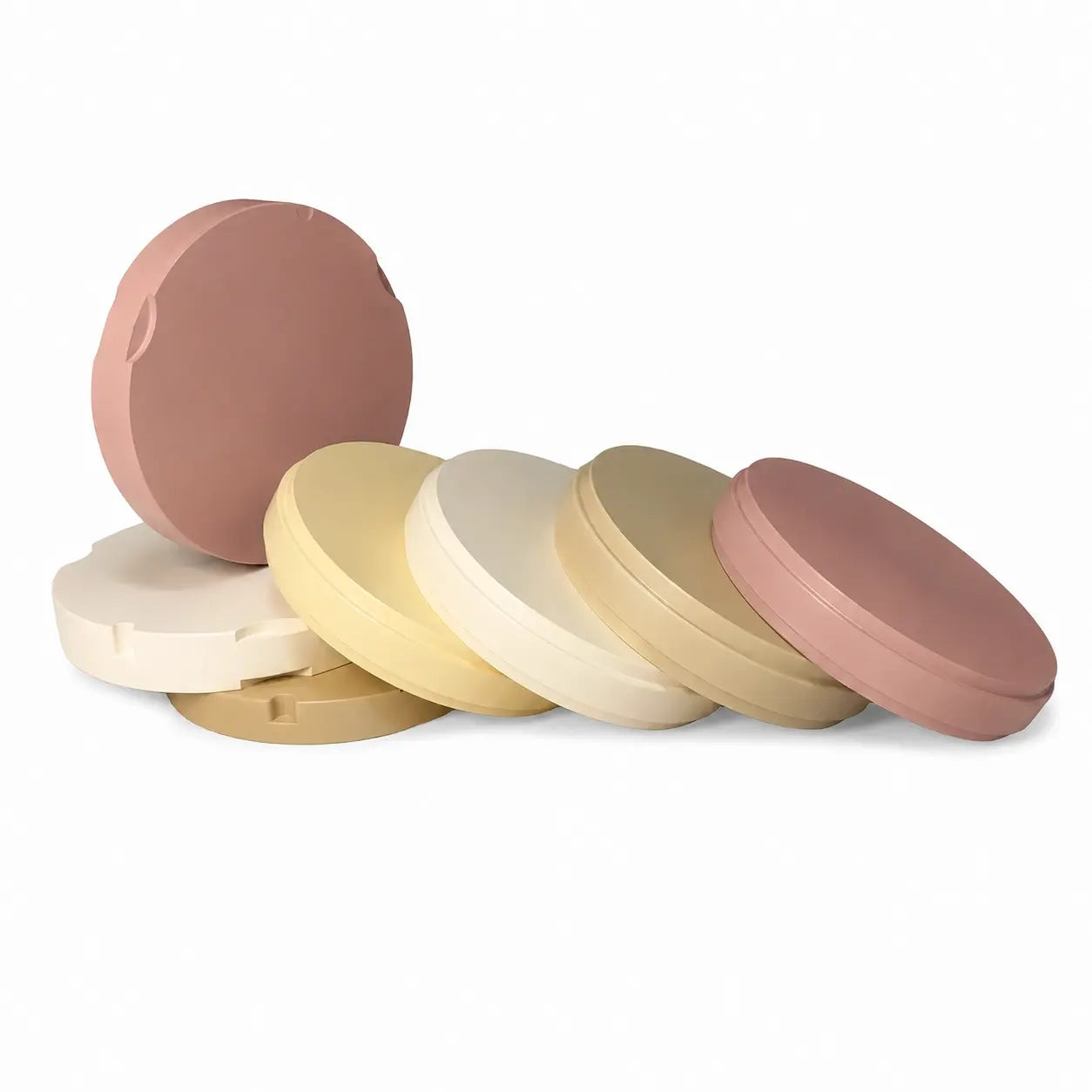
    PEEK disc material options including natural white yellow and pink colors for dental CAD/CAM milling

    Yellow PEEK for Digital Dental Laboratory Workflows

    OnePro Dental Yellow PEEK Disc is a CAD/CAM polymer material designed for professional dental laboratories working with digital prosthetic and framework production.

    PEEK, or polyetheretherketone, is a high-performance thermoplastic polymer that can be digitally designed and milled using compatible CAD/CAM equipment. Unlike zirconia, PEEK does not require a post-milling sintering process, helping simplify selected polymer-based laboratory workflows.

    The Yellow version provides a distinctive warm-toned base color that can be useful when laboratories want easier visual differentiation between different PEEK materials, polymer discs, or production workflows.

    Available in both 98mm open-system and 95mm Zirkonzahn formats, Yellow PEEK provides laboratories with multiple format and thickness options for different CAD/CAM configurations.

    Final material selection and application should always follow the applicable product documentation, prosthetic design requirements, laboratory workflow, and local regulatory requirements.

    Why Dental Labs Choose Yellow PEEK

    A distinctive CAD/CAM polymer option for laboratories seeking lightweight processing, metal-free workflows, and easy material identification.

    • Warm-Toned Base Color

      The distinctive yellow color provides a warmer underlying polymer tone and makes the material easier to identify during laboratory production and inventory management.

    • Lightweight Polymer Material

      PEEK provides laboratories with a lightweight polymer alternative to traditional metallic materials for selected prosthetic and framework workflows.

    • Metal-Free CAD/CAM Option

      Yellow PEEK offers a non-metallic material choice for laboratories working with selected removable, framework, provisional, and polymer-based prosthetic applications.

    • Efficient Digital Processing

      PEEK can be digitally designed and milled without the post-milling sintering process required for zirconia, helping simplify selected CAD/CAM production workflows.

    1 of 4
    OnePro Dental Yellow PEEK disc for CAD/CAM dental milling with packaging

    Why Choose Yellow PEEK?

    A distinctive warm-toned PEEK base designed for easy material differentiation and selected prosthetic workflows.

    Yellow PEEK offers the same general CAD/CAM polymer workflow advantages associated with PEEK while providing a clearly differentiated base color within the OnePro Dental PEEK material range.

    The warm yellow tone can make the disc easier to distinguish from Natural, White, Pink, PMMA, and other polymer materials during storage, milling, finishing, and quality-control procedures.

    For laboratories using multiple PEEK colors for different workflows, visual differentiation can help simplify material organization and reduce confusion during production.

    Yellow PEEK may also be selected when a warmer underlying polymer color is preferred as part of a framework, veneering, or customized prosthetic design.

    It is important to understand that Yellow PEEK is not a final natural tooth shade or a VITA shade. The color should be considered a material base color rather than a finished shade-matched restoration.

    • Distinctive warm-toned base color
    • Easy visual material identification
    • Useful for multi-material laboratory organization
    • Suitable for selected framework and prosthetic workflows
    • Can be combined with additional finishing or veneering procedures
    Yellow PEEK disc CAD CAM milling application for dental framework fabrication

    Recommended Applications

    Yellow PEEK can support selected CAD/CAM prosthetic and framework workflows when permitted by the applicable product documentation.
    The distinctive color and CAD/CAM processing characteristics of Yellow PEEK make it a practical polymer option for laboratories working with selected framework, removable, provisional, and customized prosthetic designs.
    Common Dental Laboratory Workflows May Include:

    • Selected prosthetic framework workflows
    • Metal-free framework structures
    • Selected removable prosthetic components
    • Selected denture-related framework applications
    • Selected provisional laboratory workflows
    • Custom CAD/CAM polymer structures
    • Selected veneered framework workflows
    • Laboratory prototypes and polymer framework applications
      Important Note:

    The suitability of Yellow PEEK for a specific restoration or clinical application depends on the applicable product indication, prosthetic design, loading conditions, finishing or veneering system, instructions for use, and local regulatory requirements.

    Please contact OnePro Dental if you need to confirm whether this material is suitable for a specific laboratory application.

    Technical Specifications

    Parameter Specification
    Product Type Dental CAD/CAM PEEK Disc
    Material PEEK
    Full Material Name Polyetheretherketone
    Color Yellow
    Available Disc Formats 98mm Open System / 95mm Zirkonzahn Format
    Available Thicknesses 12mm / 14mm / 16mm / 18mm / 20mm / 22mm / 25mm
    Processing Method CAD/CAM Milling
    Post-Milling Sintering Not Required
    Primary User Professional Dental Laboratories
    Machine Compatibility Depends on disc holder, machine configuration and PEEK milling capability
    Technical Documentation Available upon request

    Technical Note:

    Mechanical properties, material composition, biocompatibility information, and other technical values should be referenced from the applicable manufacturer documentation or test reports.

    Please contact OnePro Dental if your laboratory requires specific technical data before ordering.

    Designed for Dental CAD/CAM Milling

    PEEK requires a material-specific milling strategy. Always confirm machine, holder, tool and CAM compatibility before production.

    • Confirm the Disc Format

      Check whether your milling system uses a 98mm open-system holder or the applicable 95mm configuration before ordering.

    • Use PEEK-Compatible Milling Tools

      Select milling burs recommended for PEEK or engineering polymer processing according to your milling machine and tool manufacturer.

    • Select a PEEK CAM Strategy

      Use a CAM strategy developed or validated for PEEK rather than automatically applying PMMA, zirconia or metal milling parameters.

    • Follow Machine-Specific Parameters

      Spindle speed, feed rate, bur selection, cooling method and milling strategy may vary significantly between milling systems.

    1 of 4
    Yellow PEEK disc CAD/CAM milled dental framework for removable partial denture applications

    Recommended Yellow PEEK Milling & Finishing Workflow

    1. Confirm the Disc Format
      Select the correct 98mm or 95mm disc format according to your milling machine and holder system.
    2. Design the Framework or Restoration
      Complete the CAD design according to the intended application, required dimensions, connector design, and applicable product guidelines.
    3. Select a PEEK-Compatible CAM Strategy
      Choose a milling strategy specifically suitable for PEEK or high-performance polymer materials.
    4. Mill the PEEK Disc
      Use appropriate PEEK-compatible milling tools and machine parameters according to your equipment and CAM workflow.
    5. Remove the Restoration
      Carefully separate the milled structure from the disc and remove support connections without damaging the framework.
    6. Finish the Surface
      Smooth the milled surfaces using appropriate finishing and polishing tools designed for polymer materials.
    7. Perform Surface Treatment if Required
      If additional veneering, bonding, or characterization is required, follow the instructions of the selected surface-treatment, primer, bonding, or veneering system.
    8. Final Inspection
      Check fit, margins, surface quality, framework integrity, and overall dimensions before completing the laboratory case.

    Specific milling, cooling, surface-treatment and bonding parameters depend on the milling machine, CAM software, bur system, restoration design and finishing materials.
    Always follow the applicable manufacturer's instructions and your laboratory's validated workflow.

    Choose the Right PEEK Color for Your Workflow

    OnePro Dental offers four PEEK color options to support different laboratory and prosthetic design requirements.

    Color Positioning Typical Laboratory Workflow
    Natural Neutral general-purpose base Framework-focused and selected metal-free prosthetic workflows
    White Light-colored base Selected provisional, esthetic-oriented, and light-colored framework workflows
    Pink Gingival-oriented base color Selected denture, gingival, and removable prosthetic workflows

    Recommendation

    Choose Yellow PEEK when a warmer underlying polymer color or easier visual material differentiation is preferred.

    Choose Natural PEEK for a neutral, versatile framework-focused base.

    Choose White PEEK when a lighter underlying color is preferred for selected esthetic-oriented applications.

    Choose Pink PEEK for selected gingival, denture, and removable prosthetic workflows.

    Final color selection should be based on the prosthetic design, finishing or veneering workflow, and the laboratory's clinical and technical requirements.

    What is Yellow PEEK?

    Yellow PEEK is a warm-toned polyetheretherketone CAD/CAM polymer material designed for professional dental laboratory milling and selected prosthetic, framework, and polymer-based workflows.

    What is Yellow PEEK used for in dental laboratories?

    Yellow PEEK may be considered for selected frameworks, removable, provisional, prosthetic, and customized polymer-based CAD/CAM workflows when supported by the applicable product documentation and prosthetic design.

    Why is this PEEK material yellow?

    The yellow color provides a distinctive warm-toned base and can also make the material easier to identify and differentiate from Natural, White, Pink PEEK, PMMA, and other polymer materials during laboratory production.

    Is Yellow PEEK a final natural tooth shade?

    No. Yellow PEEK provides a warm-toned polymer base but should not be considered equivalent to a final VITA tooth shade.
    Additional veneering, characterization, surface treatment, or finishing may be required depending on the prosthetic design and desired final appearance.

    What is the difference between Yellow PEEK and Natural PEEK?

    Natural PEEK provides a more neutral general-purpose base, while Yellow PEEK provides a warmer and more visually distinctive base color.

    The preferred option depends on the prosthetic design and laboratory workflow.

    What is the difference between Yellow PEEK and White PEEK?

    White PEEK provides a lighter underlying base color for selected esthetic-oriented workflows, while Yellow PEEK provides a warmer tone and greater visual differentiation during laboratory processing.

    Which thicknesses are available?

    Yellow PEEK Discs are available in 12mm, 14mm, 16mm, 18mm, 20mm, 22mm, and 25mm thicknesses.

    Is Yellow PEEK available in both 98mm and 95mm formats?

    Yes. Yellow PEEK is available in 98mm open-system and 95mm Zirkonzahn formats.

    Please confirm your milling machine and holder configuration before ordering.

    Can I mill Yellow PEEK with my existing dental milling machine?

    Compatibility depends on your machine configuration, disc holder, spindle, tooling, and CAM strategy.
    Send us your milling machine brand and exact model if you need help checking compatibility.

    Does PEEK require special milling burs?

    PEEK should be processed with milling tools and CAM strategies suitable for high-performance polymer materials. Tool requirements vary between milling systems, so follow your machine and bur manufacturer's recommendations.

    Explore More PEEK Colors

    Compare different PEEK colors and choose the base material that best matches your laboratory workflow.

    • White PEEK Disc

      A lighter PEEK base color for selected esthetic, provisional and prosthetic laboratory workflows.

    • Pink PEEK Disc

      Gingival-colored PEEK designed for selected denture and removable prosthetic laboratory workflows.

    • Natural PEEK Disc

      Neutral general-purpose PEEK for framework-focused and selected metal-free prosthetic workflows.

    • PEEK Disc Collection

      Compare all OnePro Dental PEEK color options, formats and thicknesses for your CAD/CAM workflow.

    1 of 4

    Need Help Choosing or Milling PEEK?

    Tell us your milling machine brand and model, CAM software, restoration type, required disc format, thickness and quantity.

    Our team can help you select the appropriate PEEK option, confirm machine compatibility, and review available technical or regulatory documentation before ordering.